
Quickbooks comes in many flavors, and once upon a time, this was a piece of Desktop software - today QBO - QuickBooks Online - is the way to go for pretty much every small business and startup.The only remaining Quickbooks desktop applications are heavyweight solutions meant for manufacturing, inventory, or enterprise level companies, so if you are a typical startup do yourself a favor and start with a version of QuickBooks Online.
Another advantage of QBO is that you or your bookkeeper can access your financials, run reconciliations, and more from anywhere with a secure internet connection.
What is the best version of QuickBooks for your startup?
The best version of QBO for a startup is usually QBO Essentials, the version of QBO that Intuit designed for companies that expect growth and to eventually have a professional finance team.
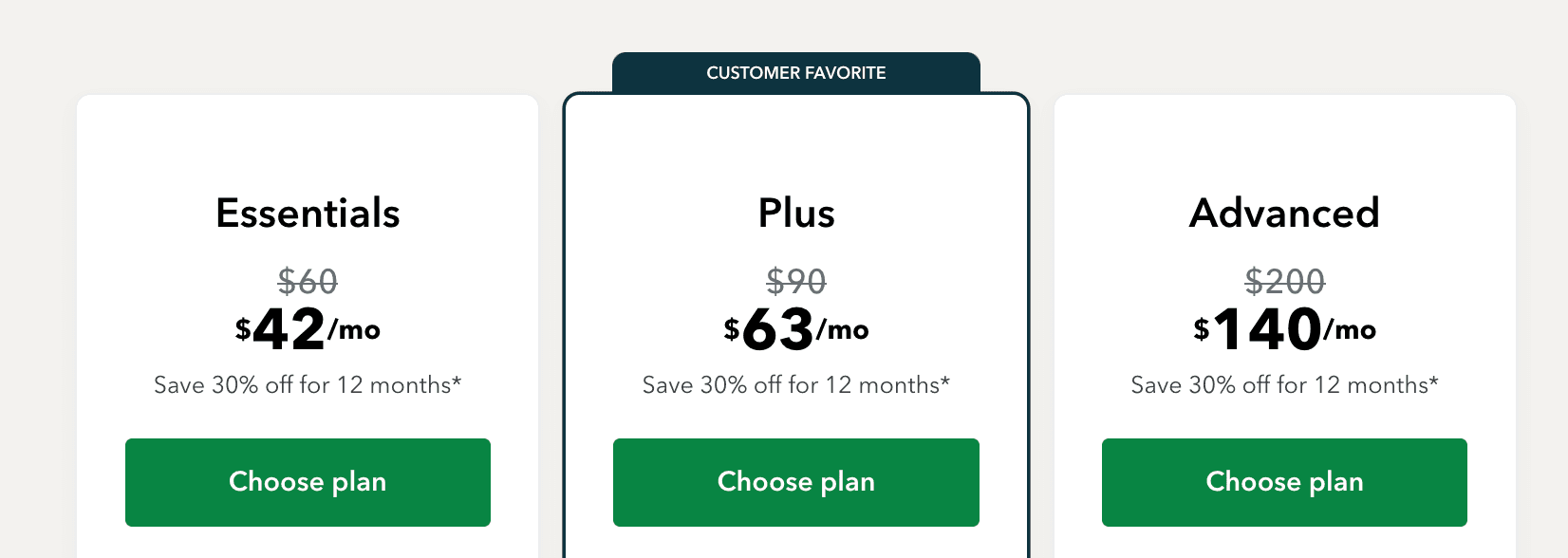
Here are the Quickbooks Online options, of which there are 5:
- Quickbooks Solopreneur: best for Single Member LLC, one person consultants, etc, whose company has less than <$100K in revenue. The $20 per month looks pretty great, but it’s not for you if you are building a VC-backed startup.
- Quickbooks Online Simple Start: too simple. Don’t do it. Not having bill tracking and multiple users is a deal killer. I’m not even showing it as an option, even though it’s only $45 a month.
- Quickbooks Online Essentials: WINNER WINNER CHX DINNER! Start with QBO Essentials. Its just right for 92%+ of Seed Startups who come to us. It’s $60 a month, and you get a discount if you use our link (and we make a small commission). Get it here.
- Quickbooks Online Plus: upgrade to this version after QBO Essentials when you’re ready to start tracking departments or different service lines. This typically happens when you’re 20+ employees or have greater than >$100K in revenue.
- Quickbooks Online Advanced: upgrade to this version after QBO Plus when you’re ready to start tracking departments, profitability by project, or different service lines. This typically happens when you’re 50+ employees, have an accounting team of 5+ people, or have greater than >$5M in revenue.
We strongly believe that QuickBooks Online is the best accounting software for startups (especially if you are based in the US). Lots of API integrations into banks and credit cards and other fintech software, pretty good UX, and it’s an accepted industry standard - so pretty much any CPA or VP of Finance should be able to use it. You can typically access it for a year after cancelling.
QuickBooks Online: Comparing the Most Popular Versions for Startups
When new clients come to Kruze, our accounting team is often asked to compare the two most popular versions of QBO. The two QuickBooks Online versions that founders most frequently ask about are Simple Start and Essentials. As we’ve already mentioned, we strongly recommend early-stage companies go with Essentials.
Simple Start Version
- Basic accounting features (income/expense tracking, invoicing, sales tax)
- Basic reporting (profit/loss, balance sheet)
- Single user access
- Receipt capture
- Mobile app
Ideal for: Freelancers or very small businesses with basic accounting needs; not a great fit for most pre-seed, seed or Series A companies - or for companies that are about to raise professional funding.
Essentials Version (Recommended for Startups)
- All Simple Start features, plus:
- Multi-user access (up to 3 users)
- Bill management
- Time tracking
- Enhanced reporting
Ideal for: Small to medium-sized businesses and funded startups needing robust accounting features - this is the version we strongly recommend. Get it here.
Why We Recommend the Essentials Version for Startups
- Collaboration: Multi-user access enables team involvement in financial management
- Scalability: Handles increased complexity as startups grow
- Efficiency: Bill management and time tracking streamline operations
- Better Insights: Enhanced reporting aids in financial analysis and decision-making
The Essentials version provides a more comprehensive solution that aligns with the dynamic needs of startups, offering room for growth without requiring changes to a different platform or version as the business expands.
By comparing these two popular versions of QuickBooks Online, founders can make an informed decision based on their current needs and future growth plans. While the Simple Start version seem compelling, we find that most growing startups quickly benefit from the additional features offered in the Essentials version.
PS. Intuit is going to do a hard sell on their payroll “add-on” - you can sign up for that at any time, so before you select it, read about the best payroll providers for startups - we cover Gusto, Rippling and some PEOs.

Vanessa Kruze, a seasoned CPA, has an impressive track record prior to establishing Kruze Consulting. Her experience includes pivotal roles at Deloitte Tax and as a controller for a substantial startup with over 120 employees and $20 million in revenue. Under her leadership, Kruze Consulting has emerged as a distinguished CPA firm, recognized on the Inc 5000 list for five consecutive years, illustrating rapid growth and success in the competitive accounting landscape. Vanessa's unique approach, combining deep industry knowledge with advanced automation and software solutions, has positioned her firm as a leader in providing comprehensive accounting services to startups across the United States.
