

Startups with 50 or more full-time employees, including full-time equivalent employees, use IRS Form 1095-C to report information about the health coverage they offer to their employees.
This form is a key component of the Affordable Care Act (ACA) compliance requirements for applicable large employers (ALEs).
What does Form 1095-C include?
Form 1095-C communicates the details of the health insurance coverage startups provide to their employees, including details about the coverage offered, the cost of coverage, the months it was available, and the employee’s enrollment status.
When is Form 1095-C due?
Startups must furnish Form 1095-C to employees by the deadline specified by the IRS, usually around early February, and also submit copies of these forms to the IRS. Startups need to maintain accurate records to ensure the information they report on Form 1095-C is correct, and many use software programs or work with a professional employer organization (PEO) to help manage the process. Contact us for more information on 1095-C requirements.
Step-by-step instructions: Form 1095-C
IRS Form 1095-C, Employer-Provided Health Insurance Offer and Coverage, is used by applicable large employers (ALEs), typically with 50 or more full-time employees, to report information about health insurance coverage offered to their employees. Like many tax forms, this form can be complex and we strongly recommend that startups consult a tax professional or CPA. This form is part of the Affordable Care Act (ACA) reporting requirements.
Here are step-by-step Form 1095-C instructions for a startup company to fill out this form:
Step 1: Confirm Your Startup’s Filing Requirements
Ensure your startup is required to file Form 1095-C:
- Your startup is considered an Applicable Large Employer (ALE) if you employed an average of 50 or more full-time employees (or full-time equivalents) during the previous calendar year.
- You must file Form 1095-C for each full-time employee, even if they did not participate in your health plan.
Step 2: Download Form 1095-C and Instructions
- Visit the IRS website and download the latest version of Form 1095-C and the corresponding Form 1095-C Instructions.
Step 3: Complete Part I - Employee and Employer Information

- Employee Information (Lines 1-6)
- Line 1: Enter the employee’s full name.
- Line 2: Enter the employee’s Social Security Number (SSN).
- Line 3: Enter the employee’s street address, including city, state, and ZIP code.
- Employer Information (Lines 7-13)
- Line 7: Enter your startup’s Employer Identification Number (EIN).
- Line 8: Enter your startup’s name (as it appears on tax documents).
- Line 9: Enter your startup’s street address, including city, state, and ZIP code.
- Line 10: Enter a contact phone number for your startup.
- Line 11: Enter your startup’s name again.
- Line 12: Enter your EIN again.
- Line 13: Enter the employer’s address once more (including city, state, and ZIP code).
Step 4: Complete Part II - Employee Offer of Coverage
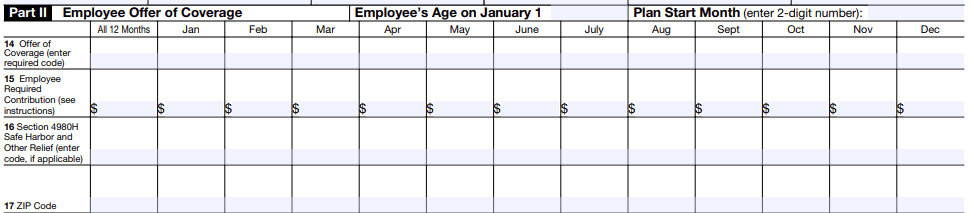
This section reports the offer of health insurance coverage made to the employee during the tax year.
- Line 14 - Offer of Coverage Code
- Enter the appropriate code for each month in the year to indicate the type of coverage you offered the employee.
- Example codes:
- Code 1A: Minimum essential coverage providing minimum value offered to full-time employee, with affordable coverage based on the federal poverty line.
- Code 1E: Minimum essential coverage providing minimum value offered to the employee and at least minimum essential coverage offered to dependent(s) and spouse.
- If the offer was made for all 12 months, enter the code in the “All 12 Months” box; otherwise, enter the code in the boxes for each applicable month.
- Line 15 - Employee Share of Lowest-Cost Monthly Premium
- If Code 1B, 1C, 1D, or 1E was entered in Line 14, enter the employee’s share of the lowest-cost monthly premium for self-only minimum essential coverage that provides minimum value.
- Leave this blank if no offer was made, or if you entered Code 1A in Line 14.
- Line 16 - Applicable Safe Harbor Codes
- Enter a safe harbor code (if applicable) to explain why your startup may be exempt from a penalty under the employer shared responsibility provisions (IRC Section 4980H).
- Example codes:
- Code 2A: Employee was not employed during the month.
- Code 2C: Employee enrolled in coverage offered.
- Code 2G: Offer of coverage was affordable based on the federal poverty line.
Step 5: Complete Part III - Covered Individuals (if applicable)
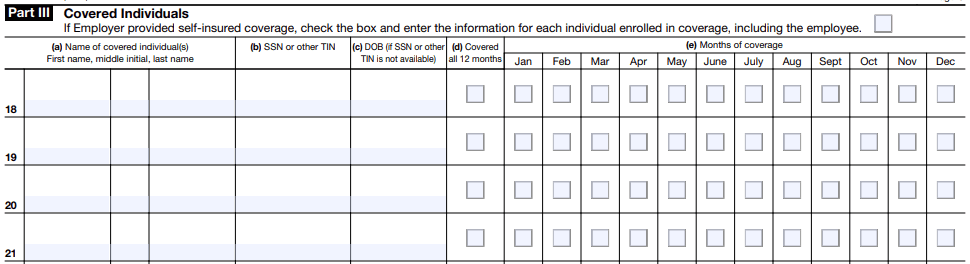
This section is completed only if your startup’s health insurance is self-insured. If your startup offers fully insured plans, skip this section.
- Column (a) - Name of Covered Individual
- List the name of the employee and any covered dependents.
- Column (b) - SSN
- Enter the Social Security Number for each covered individual. If you do not have an SSN for a dependent, use their date of birth in column (c).
- Column (c) - Date of Birth
- Enter the date of birth only if the SSN is not available.
- Column (d) - Covered All 12 Months
- If the individual was covered for the entire year, check this box.
- Column (e) - Months of Coverage
- If the individual was covered for fewer than 12 months, check the box for each month in which the individual was covered.
Step 6: Review and Prepare for Filing
- Review. Double-check all employee and employer information for accuracy, especially SSNs and EINs.
- Corrections. Make sure all the information aligns with the insurance coverage provided throughout the year.
Step 7: File Form 1095-C with the IRS
- Electronic Filing: If you are filing 250 or more forms, you are required to file electronically through the IRS Affordable Care Act Information Returns (AIR) system.
- Paper Filing: If you are filing fewer than 250 forms, you can submit them by mail. The address depends on your business location, so check the IRS instructions.
Step 8: Distribute Form 1095-C to Employees
- You must provide a copy of Form 1095-C to each employee by March 2 (or the next business day if March 2 is a weekend or holiday) of the year following the reporting year. This can be done electronically (with employee consent) or by mail.
Step 9: Keep Records
- Retain copies of Form 1095-C and all supporting documentation for at least three years in case of an IRS audit.
Tips for Filing Form 1095-C
- Use an experienced startup accountant. As you can see from these Form 1095-C instructions, tax forms are complicated. We recommend you work with an experienced startup tax professional.
- Consult a payroll provider. Many payroll services assist with ACA reporting, including generating and filing Forms 1095-C.
- Use safe harbor codes. Properly applying safe harbor codes can protect your startup from penalties.
- Track full-time equivalents (FTEs). If your startup is close to the 50-employee threshold, carefully track FTEs to determine whether you must file Form 1095-C.